

Charming Seal·API
The whole API, on one page.
Seven REST routes, one MCP endpoint, and a key you issue to yourself. Every example here is written against your own deployment, because the only instance you can call is the one you run.
Base URL
Your domain is the API.
There is no shared endpoint and no account to open. Charming Seal is self-hosted, so the base URL is whatever address you deployed it to. Read your-domain.com below as a stand-in for yours.
Keys are made in the shop, and shown once.
Open Settings → API Keys in your own dashboard and create one. It is displayed at that moment and never again, because the shop keeps only a hash of it. That is deliberate: there is nothing left in the database for an attacker to read back, and nothing for us to read back either. Lose a key and you issue another.
# on every request, without exception
Authorization: Bearer csk_live_YOUR_KEY
The smallest call there is, to prove the key works before you build anything on it.
curl https://your-domain.com/api/v1/settings \
  -H "Authorization: Bearer csk_live_YOUR_KEY"
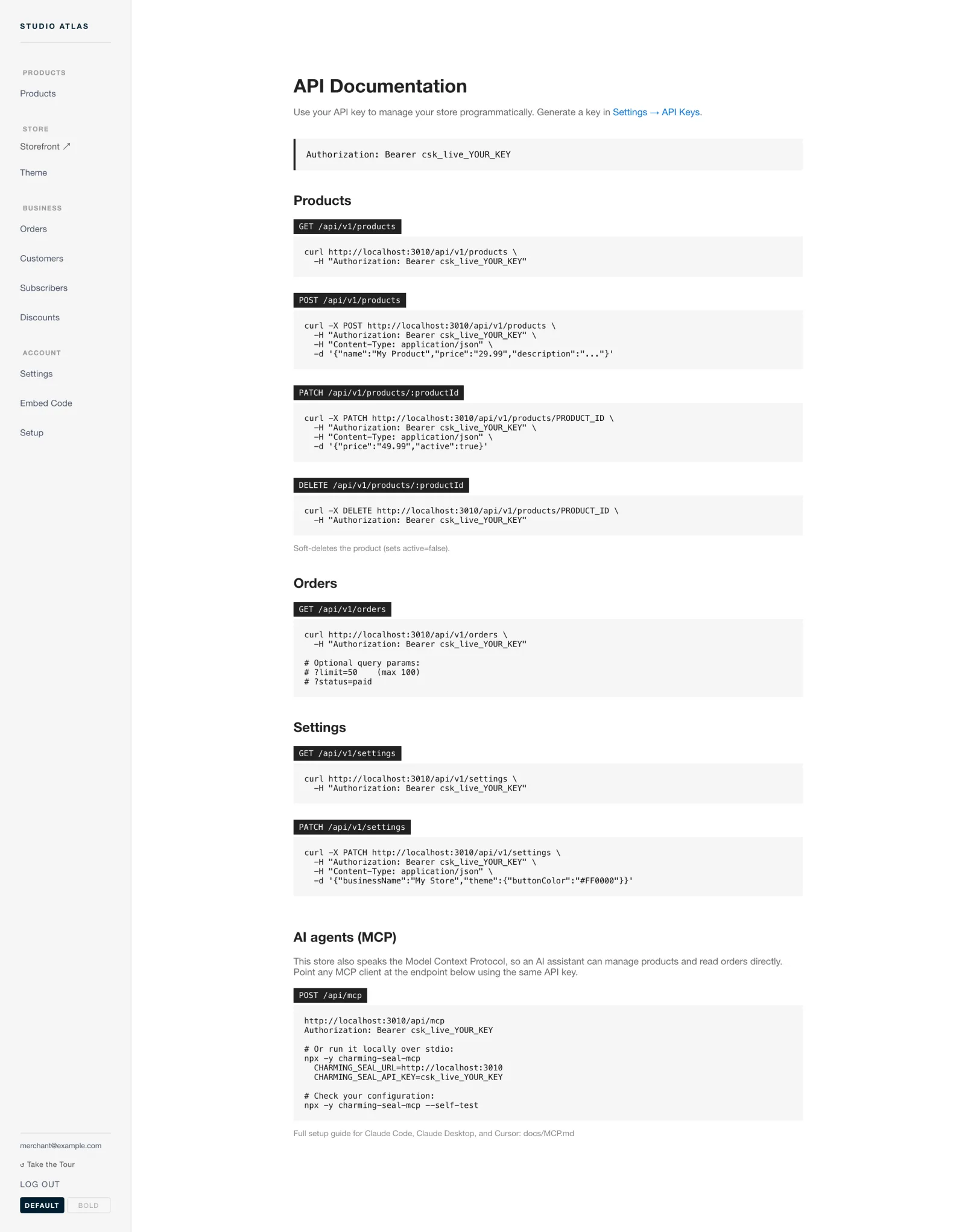
A running instance carries its own copy of this reference, at your address rather than ours.
Conventions
Five things that hold across every route.
| Base path | Everything under /api/v1, on your own host. The MCP endpoint sits at /api/mcp. |
| Money in | Prices are sent in dollars, written as a string: "29.99". |
| Money out | Responses carry the figure twice, as price and as integer amount_cents. |
| Product states | draft, live, hidden, archived. Separate from the active flag. Only what is live and active is listed to an agent. |
| Deleting | DELETE is a soft delete. It sets active=false and leaves the record in place. |
# the same price, both ways, so nobody divides by 100 by accident
"price": "29.99",
"amount_cents": 2999
Resource I
Products
Four routes: read the catalogue, add to it, change an entry, retire one.
GET /api/v1/products
The catalogue.
curl https://your-domain.com/api/v1/products \
  -H "Authorization: Bearer csk_live_YOUR_KEY"
POST /api/v1/products
Creates a product from a name, a price and a description.
curl -X POST https://your-domain.com/api/v1/products \
  -H "Authorization: Bearer csk_live_YOUR_KEY" \
  -H "Content-Type: application/json" \
  -d '{"name":"Field Notes","price":"29.99","description":"A pocket notebook."}'
Send the price in dollars, as a string. "29.99" means twenty-nine dollars and ninety-nine cents. The response gives you back both that string and amount_cents, so you never have to guess which unit you are holding.
PATCH /api/v1/products/:productId
Changes a product in place. Send the fields you want changed and leave the rest out.
curl -X PATCH https://your-domain.com/api/v1/products/PRODUCT_ID \
  -H "Authorization: Bearer csk_live_YOUR_KEY" \
  -H "Content-Type: application/json" \
  -d '{"price":"49.99","active":true}'
Same money rule as above. active is the flag a delete turns off, so this is also how a retired product comes back.
DELETE /api/v1/products/:productId
A soft delete. It sets active=false. The row is not erased.
curl -X DELETE https://your-domain.com/api/v1/products/PRODUCT_ID \
  -H "Authorization: Bearer csk_live_YOUR_KEY"
Nothing here removes a record permanently. If you want the row gone from Postgres, that is a database job, and worth thinking about twice while old orders still point at it.
Resource II
Orders
One route, and it reads.
GET /api/v1/orders
curl "https://your-domain.com/api/v1/orders?limit=50&status=paid" \
  -H "Authorization: Bearer csk_live_YOUR_KEY"
limit | How many orders come back. 100 is the ceiling. |
status | status=paid narrows the list to orders that were paid. |
Quote the URL in a shell, or your shell will eat the &. Nothing in the API creates or edits an order: those arrive from checkout, and refunds and CSV export are dashboard work.
Resource III
Settings
The shop's own record: business name, theme values and configuration.
GET /api/v1/settings
Reads the record. It is also the cheapest way to confirm a key is live.
curl https://your-domain.com/api/v1/settings \
  -H "Authorization: Bearer csk_live_YOUR_KEY"
PATCH /api/v1/settings
Writes to it.
curl -X PATCH https://your-domain.com/api/v1/settings \
  -H "Authorization: Bearer csk_live_YOUR_KEY" \
  -H "Content-Type: application/json" \
  -d '{"businessName":"My Store","theme":{"buttonColor":"#FF0000"}}'
Theme values are nested under theme. Send only the ones you are changing. Colour tokens here are the same ones the theme customiser edits with a live preview, so use the preview first if you would rather see a colour than picture it.
AI agents (MCP)
The same shop, through a tool call.
An MCP client can work the shop directly instead of going through curl. Two ways in, both gated by the key you already made.
Hosted, over HTTP.
Every instance answers MCP at its own address. Point a client that speaks MCP over HTTP at the endpoint and give it the same bearer key.
curl -X POST https://your-domain.com/api/mcp \
  -H "Authorization: Bearer csk_live_YOUR_KEY" \
  -H "Content-Type: application/json"
Local, over stdio.
The published server is charming-seal-mcp. It needs two environment values and nothing else.
CHARMING_SEAL_URL=https://your-domain.com \
CHARMING_SEAL_API_KEY=csk_live_YOUR_KEY \
npx -y charming-seal-mcp
Per-client setup is in the MCP guide.
Check it before you trust it.
npx -y charming-seal-mcp --self-test
It verifies the connection to the instance you pointed it at. A failure at that point is a wrong URL or a wrong key, and it is far better found here than halfway through an agent transcript.
list_products | The catalogue an agent may sell from: live and active only |
get_product | A single product by id |
create_product | Adds a product from a name, a price and a description |
update_product | Edits an existing product in place |
delete_product | The soft delete. Sets active to false |
list_orders | Recent orders, narrowed by status |
get_settings | Reads the shop record |
update_settings | Writes to it |
Eight tools, and the same key gates every one of them. An agent holding that key can reprice your catalogue, so give it a key of its own rather than one you already use elsewhere.
Handling keys
A key is a spare set to the whole shop.
It reads your orders and it moves your prices. Treat it the way you treat the Stripe secret sitting next to it.
Beyond the surface
The code behind every route is right there.
This page documents what the routes accept and return. What they actually do with your money is a matter of reading them, which you can, because the whole application ships as source.